Chrome extension for your own Search Console account

Request indexing in Google Search Console, on autopilot.

Queue hundreds of URLs. Index Queue requests them in Google Search Console for you, one at a time and within each property’s daily limit, then shows you exactly what Google indexed.

  • No API keys
  • No Indexing API
  • Your data stays in your browser
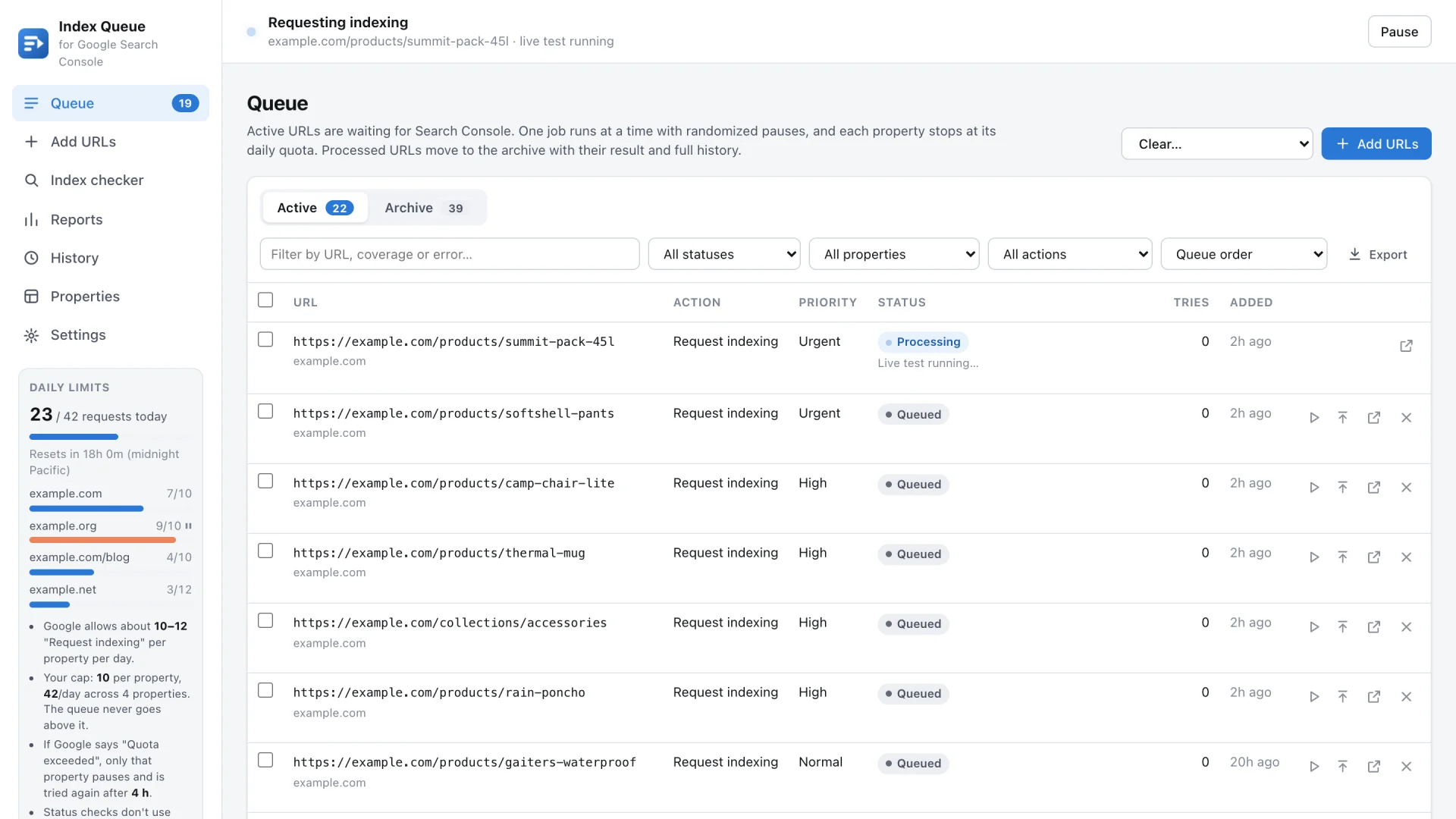
Index Queue dashboard: the request indexing queue with one URL in progress and a daily limits panel for each Search Console property
10–12

indexing requests per property per day: Search Console’s own cap, never exceeded

60–120 s

between requests, with optional active hours

4 h

after “Quota exceeded”, only that property waits, then it tries again

0 servers

your queue, history and reports stay in Chrome

How it works

From a list of URLs to indexed pages

  1. Add your URLs

    Paste a list, upload a TXT or CSV file, import a sitemap, or right-click any page or link. Duplicates and tracking parameters are cleaned up for you.

  2. The queue does the clicking

    Search Console opens in a minimized window. For each URL the queue runs URL Inspection, skips pages already on Google and clicks Request indexing.

  3. See what Google did

    Every URL lands in the Archive with its result, coverage reason and last crawl. A few days later it is checked again, and re-submitted if it is still missing.

Why not the Indexing API?

The Indexing API isn’t made for your pages

Google’s Indexing API is only meant for pages with job postings or livestream videos. For an ordinary page it isn’t supported, so URLs sent that way often never get indexed, and Google warns that misuse can get your access revoked.

“Request indexing” in Search Console is the method Google offers for every kind of page. Index Queue simply takes the tedious part off your hands: no more opening Search Console, pasting a URL, waiting for the live test and clicking the button, again and again.

Indexing API compared with Index Queue
Indexing APIIndex QueueSearch Console “Request indexing”
Meant forJob postings and livestream videos onlyAny page on your property
Ordinary pagesNot supported, often not indexedGoogle’s own method for every page
SetupGoogle Cloud project, service account, owner accessYour normal Search Console sign-in
Daily limitHigher quota, but only for supported pagesAbout 10–12 per property, scheduled for you
Your effortCode or a third-party tool, plus key managementPaste the URLs once; the queue does the rest

Archive

Every processed URL, with its full history

  • Result, Google’s coverage reason and last crawl date for each URL
  • A timeline of every request, status check and verification
  • Request again, re-check or open in Search Console in one click
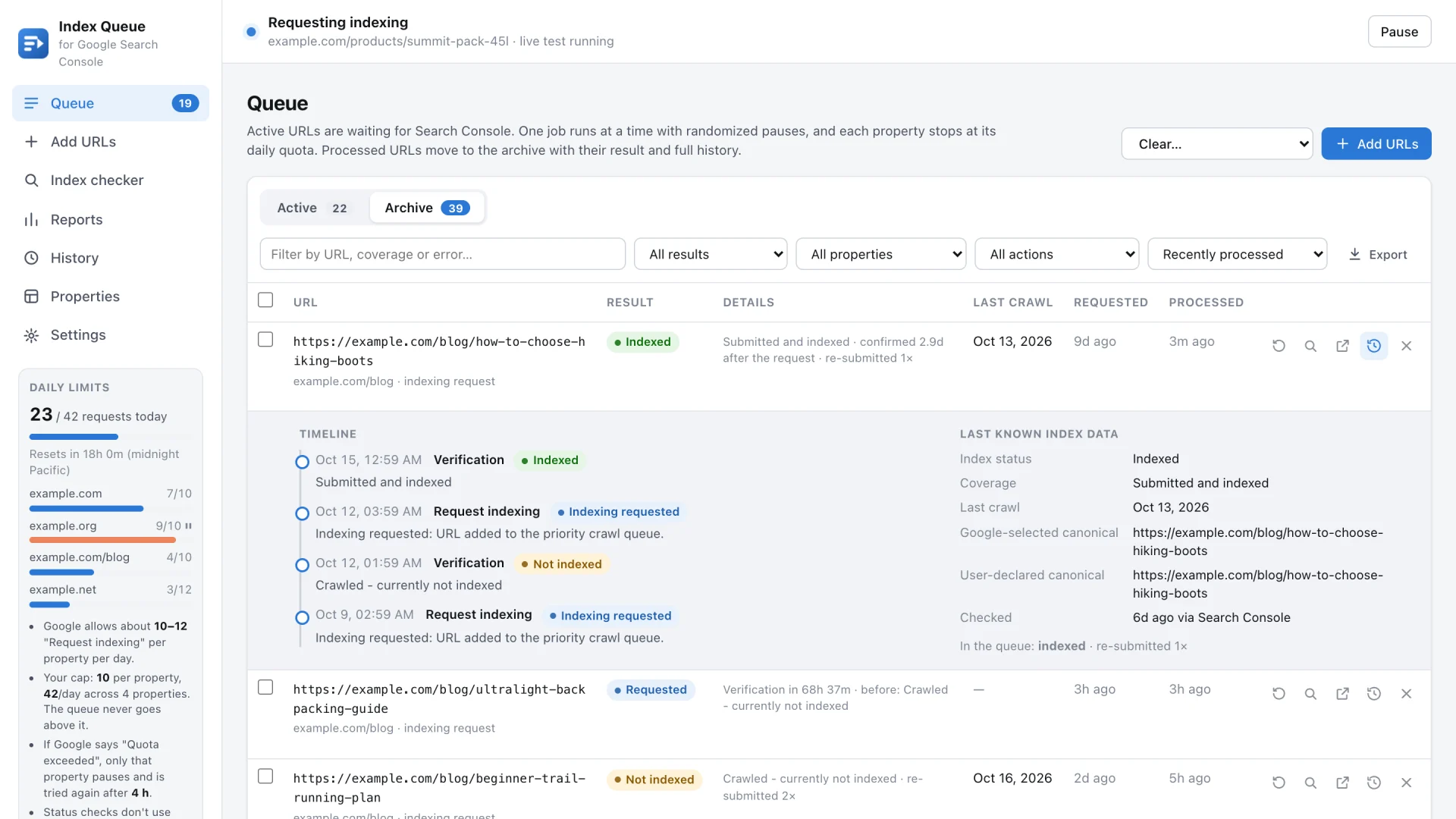
Archive of processed URLs with a timeline: indexing requested, not indexed, re-submitted, then indexed
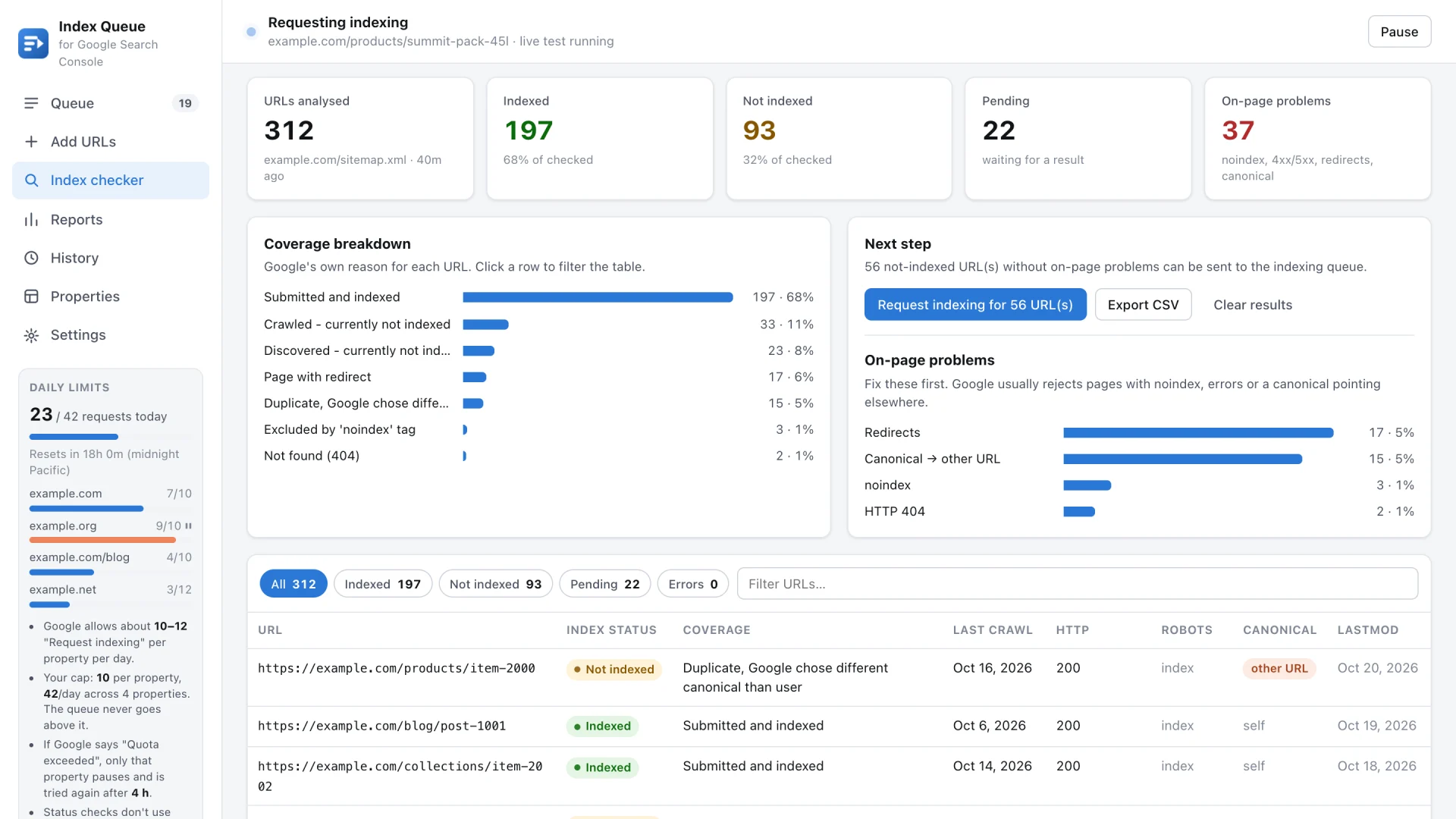
Sitemap index checker: indexed and not indexed URLs, Google coverage reasons and on-page problems

Sitemap analyzer

See which sitemap URLs Google indexed

  • Enter a sitemap or just your domain; nested sitemaps and .gz files are followed
  • Google’s reason for every URL that isn’t indexed
  • On-page audit: HTTP status, redirects, noindex and canonical
  • Send every missing URL to the queue in one click

Reports

Reports that show what worked

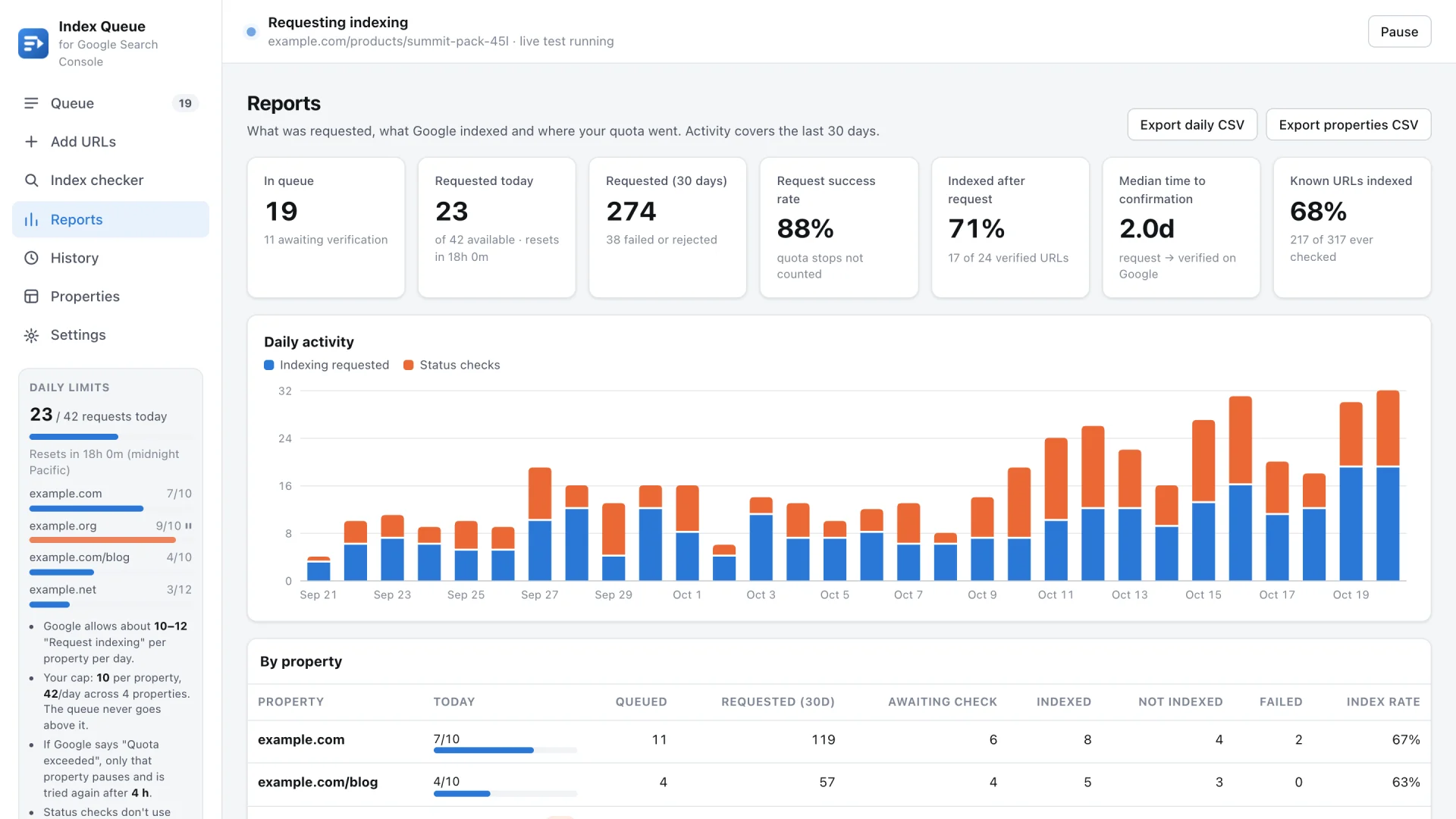
  • Requests and status checks per day, and the request success rate
  • How many requested URLs were indexed, and how long it took
  • Quota use and results for every property, with CSV export
Indexing reports: requests per day, success rate, indexed after request and median time to confirmation

Toolbar

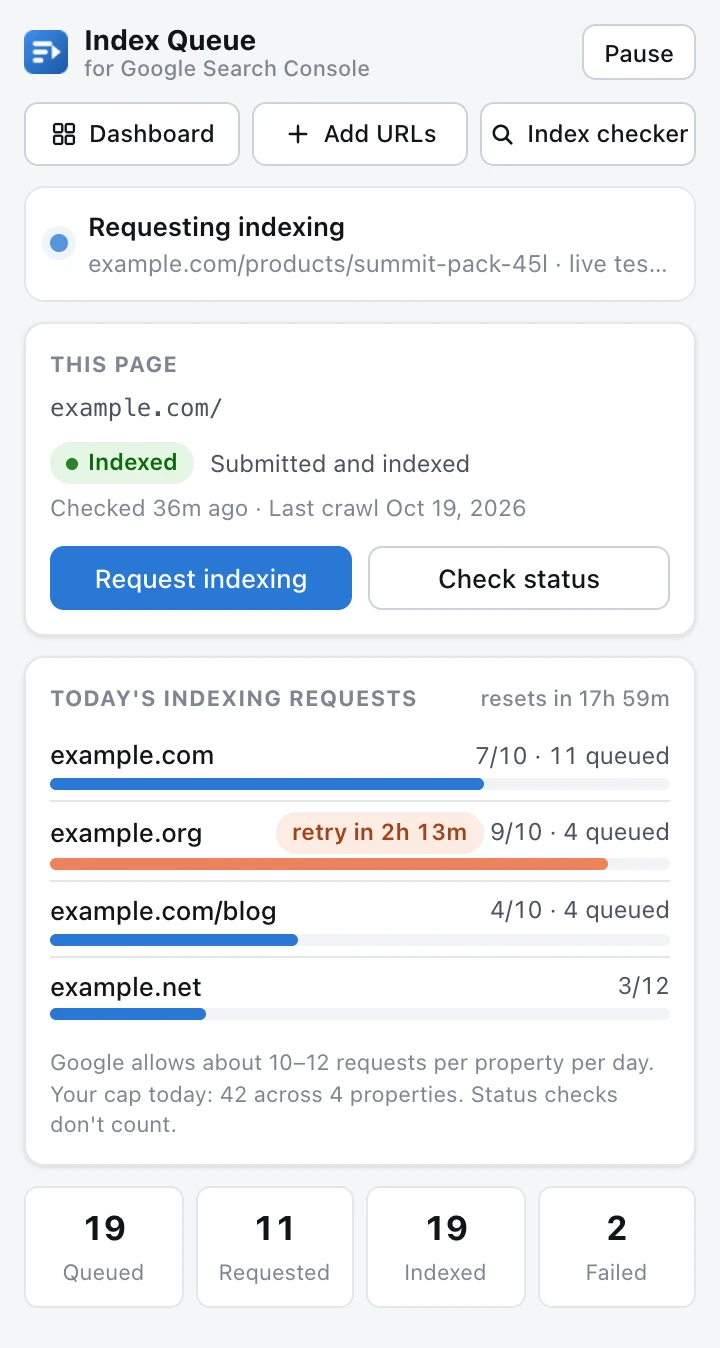
The index status of the page you’re on

  • ✓ or ✕ on the toolbar icon for pages on your own properties
  • Coverage reason and last crawl, with Request indexing and Check status buttons
  • Shortcuts: Alt+Shift+I queues the page, Alt+Shift+C checks it

Daily limits

Daily limits, handled for you

Search Console only accepts a few indexing requests per property each day. Index Queue plans around that, so a list of 500 URLs is simply spread over the following days.

Your cap, per property
About 10–12 a day is Google’s limit. Set yours (default 10); the queue never goes above it.
“Quota exceeded”
Only that property pauses and tries again 4 hours later. The others keep running.
Resets at midnight Pacific
The queue picks up again on its own when the new day starts.
Overlapping properties
A URL covered by a Domain and a URL-prefix property uses whichever still has quota.

Several Google accounts? Covered.

Each property remembers the account (u/0, u/1…) and email it belongs to. If Google re-orders your signed-in accounts, or an account can’t open a property, the other accounts are tried automatically.

Private by design

No servers, no analytics, no tracking. Your queue, history and reports live in Chrome’s local storage, and the extension only talks to Google Search Console, in your own session. Read the privacy policy.

Questions

Does it use the Indexing API?
No. Google only supports the Indexing API for job postings and livestream videos, so for ordinary pages it often doesn’t lead to indexing. Index Queue uses Search Console’s own “Request indexing”, in your signed-in session, which works for every kind of page. An optional, read-only Search Console API connection only makes status checks faster.
Does it get around Google’s limits?
No. It works inside Search Console’s daily limit and stops a property as soon as Google reports “Quota exceeded”. It just remembers to continue for you.
Does Chrome need to stay open?
Yes, the queue runs while Chrome is open. You can keep browsing; the worker window stays minimized, and the queue continues where it left off after a restart.
What if a URL still isn’t indexed?
Each requested URL is inspected again after a few days (3 by default). If it is still missing, it can be re-submitted automatically, up to a limit you choose.
Where is my data stored?
In your browser only. Export a CSV or a JSON backup at any time; uninstalling the extension removes everything.
Is it made by Google?
No. Index Queue is an independent tool and is not affiliated with or endorsed by Google.

Stop clicking “Request indexing” by hand.

Add your first list of URLs in under a minute.

Add to Chrome

Coming soon to the Chrome Web Store.